

🐕 Built for small teams, friends & families with a dog

Stop the "hey, did you do that?" conversations

Small team, friend group, or family. If there's a dog waiting for a walk, iziDo keeps everyone aligned across all your projects without endless check-ins or sticky note chaos. More done, more time for the things that matter - walking your dog!

This is interactive! Try it.
iziDo Extension
3

Up and running in 60 seconds

No complex setup. No migration headaches. Just install and start shipping together.

1

Install the extension

One click from Chrome Web Store. Opens in your browser sidebar, always ready when you are.

2

Create projects, invite your people

Add your projects, pick colors, share an invite link. Everyone sees tasks instantly.

3

Add tasks your way

Type, speak, or use Daily Planning. Tasks sync in real-time so you're always aligned.

Always On

Your tasks live where you work

No more switching tabs or opening another app. iziDo sits right in your browser sidebar, always one click away. Capture ideas mid-meeting, check off tasks between emails, and stay on top of every project without breaking your flow.

  • Opens instantly from any tab
  • Never lose context switching apps
  • Works offline, syncs when ready
your-workflow.com
3
TapTap Nudges

Gentle nudges, zero nagging

Pending tasks don't silently pile up. iziDo's TapTap system gives you subtle visual reminders right on the extension icon with a colored badge that keeps your priorities visible without interrupting your work. One glance tells you what still needs attention.

  • Badge count shows pending tasks
  • Color-coded urgency indicators
  • Non-intrusive, no popup interruptions
3
Review PR #142 SaaS App - Due today
Write blog post draft Marketing - Due tomorrow
Update team docs Mobile App - This week
Open Web View

The full picture, when you need it

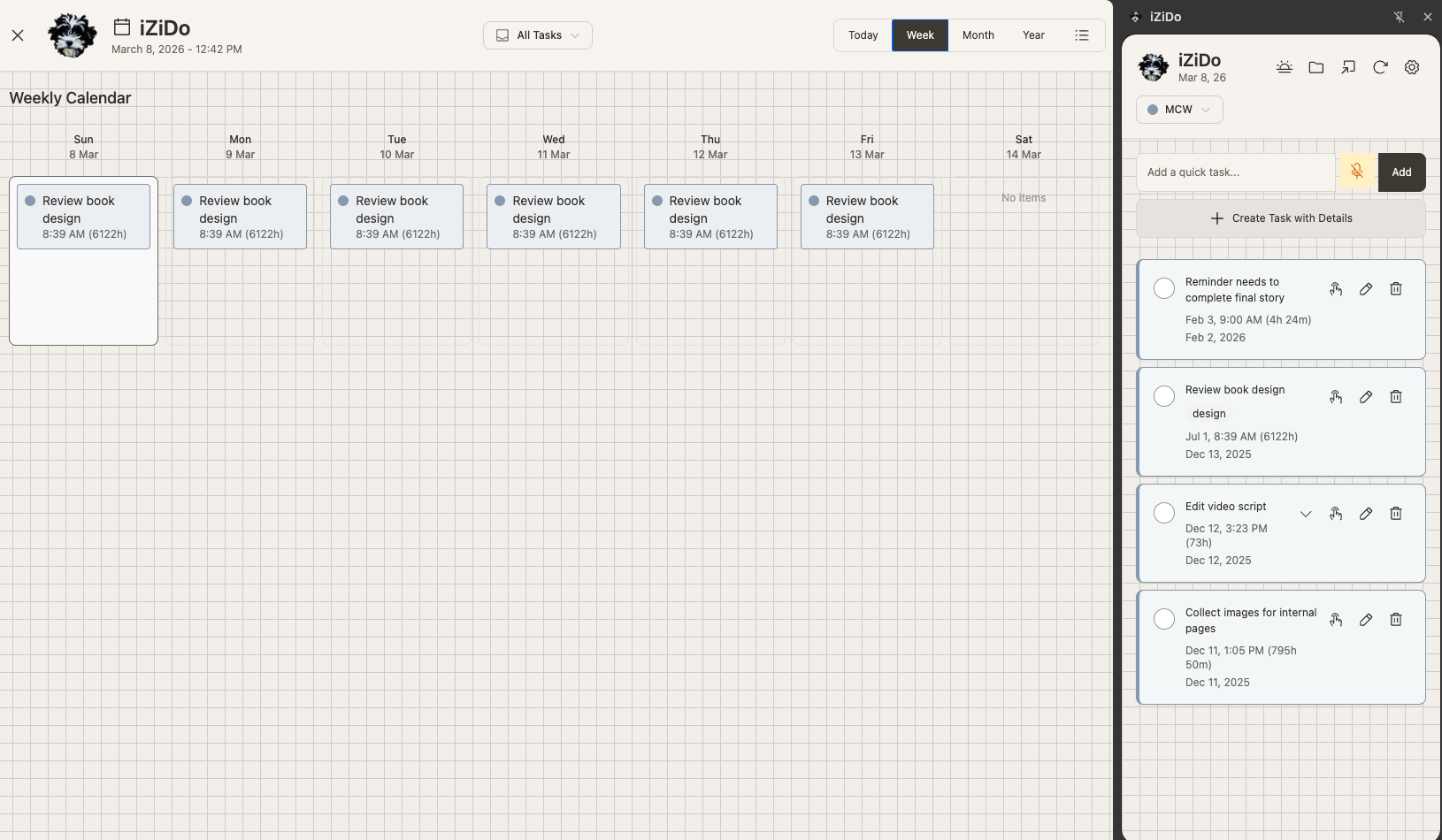
Pop open the expanded timeline in a full browser tab for deep planning sessions. See your entire week color-coded by project, drag tasks between days, and spot overloaded schedules before they become problems. It's task management that finally feels spacious.

  • Full-screen timeline with week & month views
  • Drag & drop to reschedule tasks
  • Google Calendar events side by side
February 2026
Today Week Month
Mon
Ship v2.1
Tue
Client call
Fix bug #89
Wed
Blog post
Thu
Team sync
Deploy API
Design review
Fri
Newsletter
Today's Focus
Team sync
Deploy API
Design review

Experience iziDo in 30 seconds

No signup. No install. Just play with the real interface.

1

Clean task overview

Projects, quick-add, and your task list - all in one glance. Click anytime to return here.

2

Filter by project

Click the dropdown to switch between projects or view all tasks at once.

3

Add tasks fast

Type and press Enter, or use "Create Task with Details" for dates and priority.

4

Voice input

Hold the mic, speak your task, release. Text appears in the input field.

5

Timeline view

See your week at a glance with task indicators for each day.

6

Daily Standup

Plan tomorrow project by project. Build momentum with a 2-minute routine.

iziDo Extension
3

Quick capture. Deep planning.

Two ways to work: fast sidebar for capture, expanded view for the big picture.

Instant Access

Sidebar View

Always one click away. Add tasks without leaving your current tab. Perfect for quick capture during meetings, calls, or when inspiration strikes.

2-second task entry Voice input Project switching
February 2026
Today Week Month Year
M
27
T
28
W
29
T
30
F
31
S
1
S
2
Full Overview

Expanded Timeline

Open in a new tab for the complete picture. See today's schedule with Google Calendar events, plan your week, spot busy periods, and balance workload across projects.

Today / Week / Month / Year Google Calendar sync Drag & reschedule

See the full picture

Sidebar + expanded timeline working together. Hover over the hotspots to learn more.

iziDo Timeline View with sidebar
1

Weekly Calendar

Drag tasks between days. See your week at a glance with color-coded projects.

2

Timeline Views

Switch between Today, Week, Month, and Year views. Find the zoom level that works for you.

3

Quick Sidebar

Your task list is always visible. Add, complete, and edit without leaving the timeline.

4

Project Filter

View all tasks or focus on one project. Filter applies to both calendar and sidebar.

5

Task Cards

Color-coded by project. Shows time, duration, and project badge at a glance.

Google Calendar Sync

See your meetings alongside tasks. Never double-book again.

Workload Balance

Spot overloaded days instantly. Drag tasks to balance your week.

Time Tracking

Set start times and durations. Know exactly when tasks are due.

Team Visibility

See assigned tasks with project badges. Know who's working on what.

Problems every team, friend group & family knows too well

You share the work, and a dog who wants a walk. Let's make both easier.

Tasks scattered across texts, Post-its, and "I thought you were doing that"

One sidebar, all your projects

Every task lives in iziDo, organized by project. Everyone sees the same list. No more decoding each other's shorthand.

End-of-day "where are we on everything?" conversations that never end

2-minute Daily Planning

Quick planning flow at end of day. Everyone plans tomorrow in 2 minutes. Dinner conversations stay about dinner.

No idea if your teammate finished that task or started a new one

Real-time visibility

Every task change syncs instantly. See what everyone shipped without interrupting their flow. Fewer check-ins, more trust.

Your calendar says meeting, theirs says deadline, nobody sees the full picture

Calendar + tasks unified

Google Calendar events appear alongside tasks in Timeline view. Finally see the full picture of what's happening when.

Important things slip because urgent things keep appearing

Priority that makes sense

Eisenhower Matrix helps everyone agree on what matters. Timeline views show the week ahead so nothing falls through the cracks.

You don't have time to learn a complex tool. You've got a life to live

Zero learning curve

Type a task. Or hold the mic and speak. That's it. If one person can use it, everyone can use it in minutes.

Built for how you actually work

Every team, friend group, and family works differently. iziDo adapts to yours.

The small team

Two to five people shipping together. iziDo keeps handoffs clear so nobody drops the ball. Evenings stay yours.

Friends with a plan

Planning a trip, a party, or a shared house? Shared projects make who's-doing-what obvious, so the group chat stops being the to-do list.

The club or family

Sports team, book club, volunteer group, or the whole family. Color-coded projects keep every roster and to-do separate, and your sanity intact.

The dog-walking household

Groceries, bills, school runs, and a dog who needs walking. 2-minute Daily Planning means everyone knows tomorrow's priorities before the day even starts.

Danger the Spanish Water Dog

Why we built iziDo

Meet Danger. He's a Spanish Water Dog, and technically, our project manager.

When our small team started building things together, we were drowning in tools. Notion for this, Trello for that, texts for "hey did you finish the thing?" Our evenings turned into status meetings. Weekends? More planning sessions.

Danger had opinions about this. Specifically, he had opinions about why we weren't at the park. Why we were always on our laptops. Why his walks kept getting shorter.

So we built iziDo: a task manager fast enough to capture an idea in 2 seconds, simple enough that we'd actually use it, and synced so we'd stop asking each other "wait, where are we on that?"

Now we ship more. And Danger gets his walks.

iziDo: Get organized. Go outside. Walk the dog.

The iziDo effect

What changes when you get organized together.

😫 Before
  • → Dinner conversations turn into status meetings
  • → "Did you do the thing?" texts all day
  • → Important tasks slip through the cracks
  • → Evenings spent syncing instead of living
  • → Weekends become planning sessions
  • → The dog gives you side-eye 🐕
😌 After
  • → Glance at the sidebar, know you're aligned
  • → 2-minute daily planning, then done
  • → Every task has a home (and an owner)
  • → Evenings are yours again
  • → Weekends are for weekending
  • → The dog gets walked 🐕

The real metric isn't tasks completed. It's whether you made it to the park today.

What teams & friends are saying

Real feedback from small teams, friends, and families who simplified their workflow.

"Our three-person team runs two Shopify stores. Before iziDo, we'd spend every dinner talking about what needed to happen. Now we check the sidebar, see we're aligned, and actually eat."

E&M

Elena, Marco & Dana

E-commerce team

"We're four friends planning a group trip and sharing a house. iziDo's shared projects mean the group chat stopped being our to-do list. Everyone just knows what they own."

P&S

Priya, Sam & family

Friend group

"Running a book club, a soccer team, and a very opinionated dog is chaos. Daily Planning takes 2 minutes and we all start the day knowing exactly what's on our plate. Game changer."

J&A

Jordan, Alex & friends

Neighborhood family

Start free. Upgrade only when you hit a real limit.

Every account gets the same fast extension experience. Free includes 3 projects. Pro unlocks unlimited projects plus collaboration and sync for up to 5 people.

Free
$0
Forever
  • ✓ 3 owned projects
  • ✓ Unlimited tasks in every project
  • ✓ Timeline views & Daily Planning
  • ✓ Fast local cache in the extension
  • ✓ Account sync across your devices
  • ✓ Solo workflow with the full UI
  • ✓ Open source on GitHub
Get Started Free
MOST POPULAR
Pro
$9
per month
  • ✓ Everything in Free
  • ✓ Unlimited owned projects
  • ✓ Up to 5 users total
  • ✓ Shared projects with real-time sync
  • ✓ Automatic backups and restore
  • ✓ Email support
  • ✓ One plan for small teams, friends & families
Start Pro

Already using the extension? Upgrade from Settings in one click.

Done-for-you Setup
$249
One-time
  • ✓ Personal onboarding session
  • ✓ Migration and project setup help
  • ✓ Best-practice workflow configuration
  • ✓ Team invite support
  • ✓ Launch checklist and handoff
  • ✓ 30 days follow-up support
Request Setup

Upgrade prompts only appear when you hit a real limit in the extension.

🐕 Questions? Email us at hello@izido.app. We're a real team (and a real dog), not a support ticket queue.

Frequently asked questions

Everything you need to know before getting started.

Your account data lives in the cloud so your projects stay available across devices and collaborators.

The extension keeps a fast local cache so the UI stays responsive and can ride through short offline moments without feeling fragile.

iziDo keeps a local cache so you can keep moving during brief disconnects, then syncs changes when your connection returns.

Absolutely. Many users love iziDo for personal task management. The project organization and Daily Standup work great for individuals too.

iziDo works on Chrome and any Chromium-based browser (Edge, Brave, Arc, etc.). Firefox and Safari support is on our roadmap.

Not yet, but it's on our roadmap. For now, the extension works on desktop browsers. If you enable sync, your tasks will be ready when mobile launches.

No catch. Free includes 3 owned projects. Pro is $9/month when you need unlimited projects or collaboration for up to 5 people. No ads, no data selling, ever.

Not technical? No problem. Sync is built in. Create an account and your projects are ready across your devices.

If you want help setting up your workflow or migrating an existing system, the done-for-you setup service covers that.

Ready to build together without the chaos?

Start free with 3 projects. Upgrade only when you need shared projects, unlimited space, or a team of up to 5.

Get iziDo Free

Create your free account in the extension. Upgrade prompts only appear at real limits. 🐕

For developers

Live in the terminal? Meet the iziDo CLI.

The command-line version of iziDo for developers and anyone who prefers the terminal. Capture tasks, plan your day, and stay organized without leaving your shell.

View the CLI on GitHub

Tomorrow's Plan

What will you ship tomorrow?

🚀

SaaS App

3 tasks

Create New Task

Toast message